> For the complete documentation index, see [llms.txt](https://docs.go-atlassian.io/llms.txt). Markdown versions of documentation pages are available by appending `.md` to page URLs; this page is available as [Markdown](https://docs.go-atlassian.io/jira-software-cloud/issues/fields/context.md).
# Context
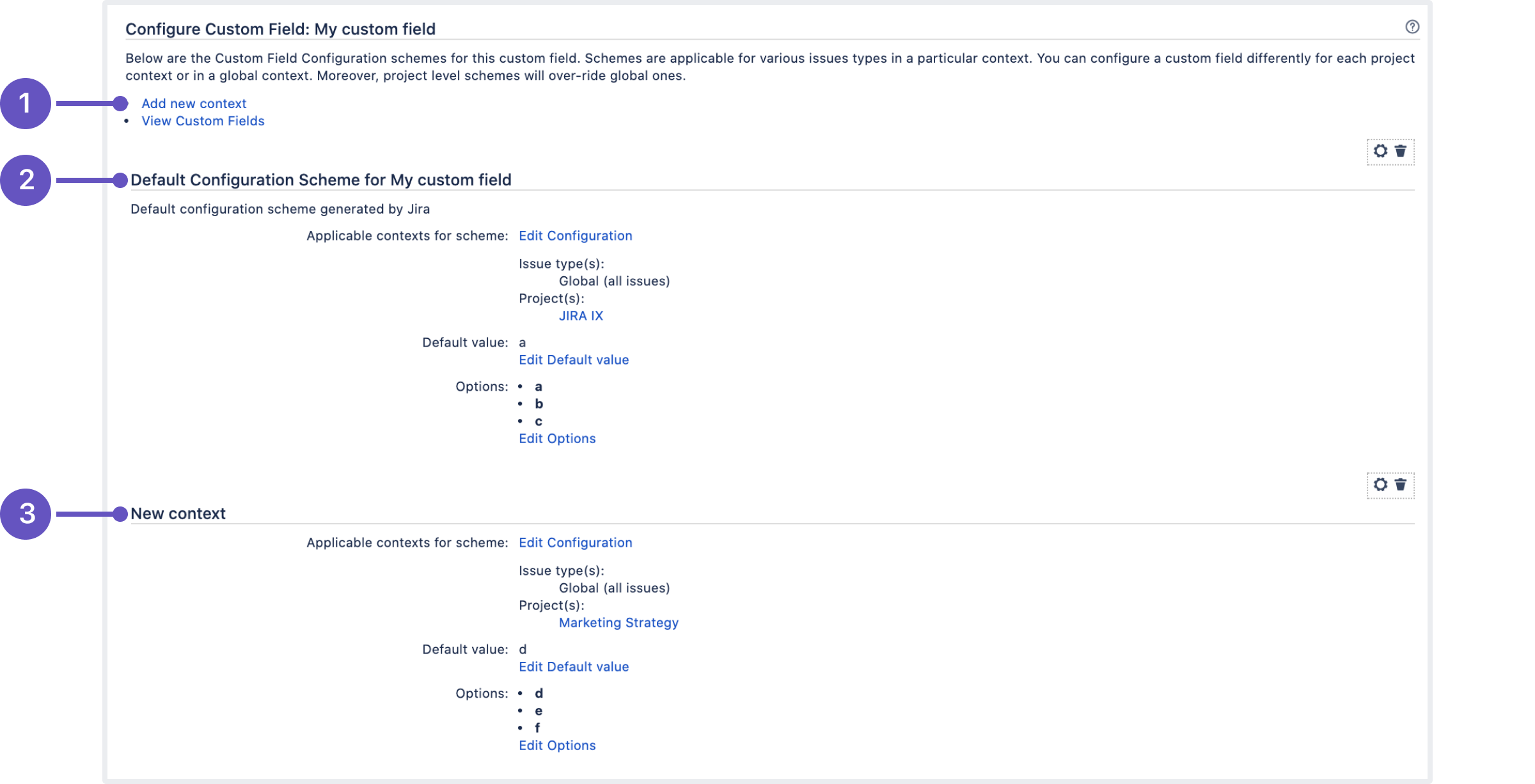
The Jira Field Context Configurations define the scope of custom fields within Jira. They determine where and how a custom field can be used within Jira, such as in which projects, issue types, and screens the field should be available. Field Context Configurations are used to ensure that the right data is captured and displayed in Jira, and that users are not presented with irrelevant fields.
Official Documentation
## Get custom field contexts
`GET /rest/api/{2-3}/field/{fieldId}/context`
Returns a [paginated](https://developer.atlassian.com/cloud/jira/platform/rest/v3/intro/#pagination) list of [contexts](https://confluence.atlassian.com/adminjiracloud/what-are-custom-field-contexts-991923859.html)
for a custom field. Contexts can be returned as follows:
* With no other parameters set, all contexts.
* By defining `id` only, all contexts from the list of IDs.
* By defining `isAnyIssueType`, limit the list of contexts returned to either those that apply to all issue types (true) or those that apply to only a subset of issue types (false)
* By defining `isGlobalContext`, limit the list of contexts return to either those that apply to all projects (global contexts) (true) or those that apply to only a subset of projects (false)
{% code fullWidth="true" %}
```go
package main
import (
"context"
"github.com/ctreminiom/go-atlassian/v2/jira/v2"
"github.com/ctreminiom/go-atlassian/pkg/infra/models"
"log"
"os"
)
func main() {
var (
host = os.Getenv("HOST")
mail = os.Getenv("MAIL")
token = os.Getenv("TOKEN")
)
atlassian, err := v2.New(nil, host)
if err != nil {
return
}
atlassian.Auth.SetBasicAuth(mail, token)
var fieldID = "customfield_10038"
options := models.FieldContextOptionsScheme{
IsAnyIssueType: false,
IsGlobalContext: false,
ContextID: nil,
}
contexts, response, err := atlassian.Issue.Field.Context.Gets(context.Background(), fieldID, &options, 0, 50)
if err != nil {
log.Fatal(err)
}
log.Println("HTTP Endpoint Used", response.Endpoint)
log.Println(contexts)
for _, fieldContext := range contexts.Values {
log.Println(fieldContext)
}
}
```
{% endcode %}
## Create custom field context
`POST /rest/api/{2-3}/field/{fieldId}/context`
Creates a custom field context. If `projectIds` is empty, a global context is created. A global context is one that applies to all project. If `issueTypeIds` is empty, the context applies to all issue types, the method returns the following information:
{% code fullWidth="true" %}
```go
package main
import (
"context"
"github.com/ctreminiom/go-atlassian/v2/jira/v2"
"github.com/ctreminiom/go-atlassian/pkg/infra/models"
"log"
"os"
)
func main() {
var (
host = os.Getenv("HOST")
mail = os.Getenv("MAIL")
token = os.Getenv("TOKEN")
)
atlassian, err := v2.New(nil, host)
if err != nil {
return
}
atlassian.Auth.SetBasicAuth(mail, token)
var fieldID = "customfield_10038"
payload := models.FieldContextPayloadScheme{
IssueTypeIDs: []int{10004},
ProjectIDs: []int{10002},
Name: "Bug fields context $3 aaw",
Description: "A context used to define the custom field options for bugs.",
}
contextCreated, response, err := atlassian.Issue.Field.Context.Create(context.Background(), fieldID, &payload)
if err != nil {
log.Fatal(err)
return
}
log.Println("HTTP Endpoint Used", response.Endpoint)
log.Println(contextCreated)
}
```
{% endcode %}
## Get custom field contexts default values
`GET /rest/api/{2-3}/field/{fieldId}/context/defaultValue`
Returns a [paginated](https://developer.atlassian.com/cloud/jira/platform/rest/v3/intro/#pagination) list of defaults for a custom field. The results can be filtered by `contextId`, otherwise all values are returned. If no defaults are set for a context, nothing is returned.
{% code fullWidth="true" %}
```go
package main
import (
"context"
"github.com/ctreminiom/go-atlassian/v2/jira/v2"
"log"
"os"
)
func main() {
var (
host = os.Getenv("HOST")
mail = os.Getenv("MAIL")
token = os.Getenv("TOKEN")
)
atlassian, err := v2.New(nil, host)
if err != nil {
return
}
atlassian.Auth.SetBasicAuth(mail, token)
var fieldID = "customfield_10038"
defaultValues, response, err := atlassian.Issue.Field.Context.GetDefaultValues(context.Background(), fieldID, nil, 0, 50)
if err != nil {
return
}
log.Println("HTTP Endpoint Used", response.Endpoint)
for _, value := range defaultValues.Values {
/*
For singleOption customField type, use value.OptionID
For multipleOption customField type, use value.OptionIDs
For cascadingOption customField type, use value.OptionID and value.CascadingOptionID
*/
log.Println(value)
}
}
```
{% endcode %}
## Set custom field contexts default values
`PUT /rest/api/{2-3}/field/{fieldId}/context/defaultValue`
Sets default for contexts of a custom field. Default is defined using these objects:
Name
Type
Description
CustomFieldContextDefaultValueSingleOption
option.single
For single choice select lists and radio buttons.
CustomFieldContextDefaultValueMultipleOption
option.multiple
For multiple-choice select lists and checkboxes.
CustomFieldContextDefaultValueCascadingOption
option.cascading
For cascading select lists.
{% hint style="info" %}
Only one type of default object can be included in a request. To remove a default for a context, set the default parameter to `null`.
{% endhint %}
{% code fullWidth="true" %}
```go
package main
import (
"context"
"github.com/ctreminiom/go-atlassian/v2/jira/v2"
"github.com/ctreminiom/go-atlassian/pkg/infra/models"
"log"
"os"
)
func main() {
var (
host = os.Getenv("HOST")
mail = os.Getenv("MAIL")
token = os.Getenv("TOKEN")
)
atlassian, err := v2.New(nil, host)
if err != nil {
return
}
atlassian.Auth.SetBasicAuth(mail, token)
var fieldID = "customfield_10038"
var payload = &models.FieldContextDefaultPayloadScheme{
DefaultValues: []*models.CustomFieldDefaultValueScheme{
{
ContextID: "10138",
OptionID: "10022",
Type: "option.single",
},
},
}
response, err := atlassian.Issue.Field.Context.SetDefaultValue(context.Background(), fieldID, payload)
if err != nil {
log.Fatal(err)
}
log.Println("HTTP Endpoint Used", response.Endpoint)
}
```
{% endcode %}
## Update custom field context
`PUT /rest/api/{2-3}/field/{fieldId}/context/{contextId}`
Updates a [custom field context](https://confluence.atlassian.com/adminjiracloud/what-are-custom-field-contexts-991923859.html).
{% code fullWidth="true" %}
```go
package main
import (
"context"
"github.com/ctreminiom/go-atlassian/v2/jira/v2"
"log"
"os"
)
func main() {
var (
host = os.Getenv("HOST")
mail = os.Getenv("MAIL")
token = os.Getenv("TOKEN")
)
atlassian, err := v2.New(nil, host)
if err != nil {
return
}
atlassian.Auth.SetBasicAuth(mail, token)
var (
customFieldID = "customfield_10038"
contextID = 10140
newName = "New Context Name"
newDescription = "New Context Description"
)
response, err := atlassian.Issue.Field.Context.Update(context.Background(), customFieldID, contextID, newName, newDescription)
if err != nil {
log.Fatal(err)
}
log.Println("HTTP Endpoint Used", response.Endpoint)
}
```
{% endcode %}
## Delete custom field context
`DELETE /rest/api/{2-3}/field/{fieldId}/context/{contextId}`
Deletes a [custom field context](https://confluence.atlassian.com/adminjiracloud/what-are-custom-field-contexts-991923859.html).
{% code fullWidth="true" %}
```go
package main
import (
"context"
"github.com/ctreminiom/go-atlassian/v2/jira/v2"
"log"
"os"
)
func main() {
var (
host = os.Getenv("HOST")
mail = os.Getenv("MAIL")
token = os.Getenv("TOKEN")
)
atlassian, err := v2.New(nil, host)
if err != nil {
return
}
atlassian.Auth.SetBasicAuth(mail, token)
var (
customFieldID = "customfield_10038"
contextID = 10140
)
response, err := atlassian.Issue.Field.Context.Delete(context.Background(), customFieldID, contextID)
if err != nil {
log.Fatal(err)
return
}
log.Println("HTTP Endpoint Used", response.Endpoint)
}
```
{% endcode %}
## Add issue types to context
`PUT /rest/api/{2-3}/field/{fieldId}/context/{contextId}/issuetype`
Adds issue types to a custom field context, appending the issue types to the issue types list.
{% code fullWidth="true" %}
```go
package main
import (
"context"
"github.com/ctreminiom/go-atlassian/v2/jira/v2"
"log"
"os"
)
func main() {
var (
host = os.Getenv("HOST")
mail = os.Getenv("MAIL")
token = os.Getenv("TOKEN")
)
atlassian, err := v2.New(nil, host)
if err != nil {
return
}
atlassian.Auth.SetBasicAuth(mail, token)
var (
customFieldID = "customfield_10038"
contextID = 10180
issueTypesIDs = []string{"10007", "10002"}
)
response, err := atlassian.Issue.Field.Context.AddIssueTypes(context.Background(), customFieldID, contextID, issueTypesIDs)
if err != nil {
log.Fatal(err)
return
}
log.Println("HTTP Endpoint Used", response.Endpoint)
}
```
{% endcode %}
## Remove issue types from context
`POST /rest/api/{2-3}/field/{fieldId}/context/{contextId}/issuetype/remove`
Removes issue types from a custom field context.
{% code fullWidth="true" %}
```go
package main
import (
"context"
"github.com/ctreminiom/go-atlassian/v2/jira/v2"
"log"
"os"
)
func main() {
var (
host = os.Getenv("HOST")
mail = os.Getenv("MAIL")
token = os.Getenv("TOKEN")
)
atlassian, err := v2.New(nil, host)
if err != nil {
return
}
atlassian.Auth.SetBasicAuth(mail, token)
var (
customFieldID = "customfield_10038"
contextID = 10180
issueTypesIDs = []string{"10007", "10002"}
)
response, err := atlassian.Issue.Field.Context.RemoveIssueTypes(context.Background(), customFieldID, contextID, issueTypesIDs)
if err != nil {
return
}
log.Println("HTTP Endpoint Used", response.Endpoint)
}
```
{% endcode %}
## Assign custom field context to projects
`PUT /rest/api/{2-3}/field/{fieldId}/context/{contextId}/project`
Assigns a custom field context to projects.
{% code fullWidth="true" %}
```go
package main
import (
"context"
"github.com/ctreminiom/go-atlassian/v2/jira/v2"
"log"
"os"
)
func main() {
var (
host = os.Getenv("HOST")
mail = os.Getenv("MAIL")
token = os.Getenv("TOKEN")
)
atlassian, err := v2.New(nil, host)
if err != nil {
return
}
atlassian.Auth.SetBasicAuth(mail, token)
var (
customFieldID = "customfield_10038"
contextID = 10179
projectIDs = []string{"10003"}
)
response, err := atlassian.Issue.Field.Context.Link(context.Background(), customFieldID, contextID, projectIDs)
if err != nil {
log.Fatal(err)
}
log.Println("HTTP Endpoint Used", response.Endpoint)
}
```
{% endcode %}
## Remove custom field context from projects
`POST /rest/api/{2-3}/field/{fieldId}/context/{contextId}/project/remove`
Removes a custom field context from projects.
{% code fullWidth="true" %}
```go
package main
import (
"context"
"github.com/ctreminiom/go-atlassian/v2/jira/v2"
"log"
"os"
)
func main() {
var (
host = os.Getenv("HOST")
mail = os.Getenv("MAIL")
token = os.Getenv("TOKEN")
)
atlassian, err := v2.New(nil, host)
if err != nil {
return
}
atlassian.Auth.SetBasicAuth(mail, token)
var (
customFieldID = "customfield_10038"
contextID = 10179
projectIDs = []string{"10003"}
)
response, err := atlassian.Issue.Field.Context.UnLink(context.Background(), customFieldID, contextID, projectIDs)
if err != nil {
log.Fatal(err)
}
log.Println("HTTP Endpoint Used", response.Endpoint)
}
```
{% endcode %}
## Get project mappings for custom field context
`GET /rest/api/{2-3}/field/{fieldId}/context/projectmapping`
Returns a [paginated](https://developer.atlassian.com/cloud/jira/platform/rest/v3/intro/#pagination) list of context to project mappings for a custom field. The result can be filtered by `contextId`. Otherwise, all mappings are returned. Invalid IDs are ignored.
{% code fullWidth="true" %}
```go
package main
import (
"context"
"github.com/ctreminiom/go-atlassian/v2/jira/v2"
"log"
"os"
)
func main() {
var (
host = os.Getenv("HOST")
mail = os.Getenv("MAIL")
token = os.Getenv("TOKEN")
)
atlassian, err := v2.New(nil, host)
if err != nil {
return
}
atlassian.Auth.SetBasicAuth(mail, token)
var fieldID = "customfield_10038"
mapping, response, err := atlassian.Issue.Field.Context.ProjectsContext(context.Background(), fieldID, nil, 0, 50)
if err != nil {
log.Fatal(err)
}
log.Println("HTTP Endpoint Used", response.Endpoint)
log.Println(mapping.Total)
}
```
{% endcode %}
---
# Agent Instructions
This documentation is published with GitBook. GitBook is the documentation platform designed so that both humans and AI agents can read, navigate, and reason over technical content effectively. Learn more at gitbook.com.
## Querying This Documentation
If you need additional information that is not directly available in this page, you can query the documentation by asking a question.
Perform an HTTP GET request on the following URL with the `ask` and `goal` query parameters:
```
GET https://docs.go-atlassian.io/jira-software-cloud/issues/fields/context.md?ask=&goal=
```
`ask` is the immediate question: it should be specific, self-contained, and written in natural language.
`goal` is what the user is ultimately trying to achieve, the reason they need the answer. Sharing it helps GitBook give you a better, more relevant answer. A goal is most helpful when it describes the outcome the user wants rather than restating the question. For example, with `ask=how do I create an API token`, a goal like `automate deployments from our CI pipeline` lets GitBook tailor the answer to that use case.
The response will contain a direct answer to the question and relevant excerpts and sources from the documentation.
Use this mechanism when the answer is not explicitly present in the current page, you need clarification or additional context, or you want to retrieve related documentation sections.