> For the complete documentation index, see [llms.txt](https://docs.go-atlassian.io/llms.txt). Markdown versions of documentation pages are available by appending `.md` to page URLs; this page is available as [Markdown](https://docs.go-atlassian.io/jira-assets/object.md).
# Object
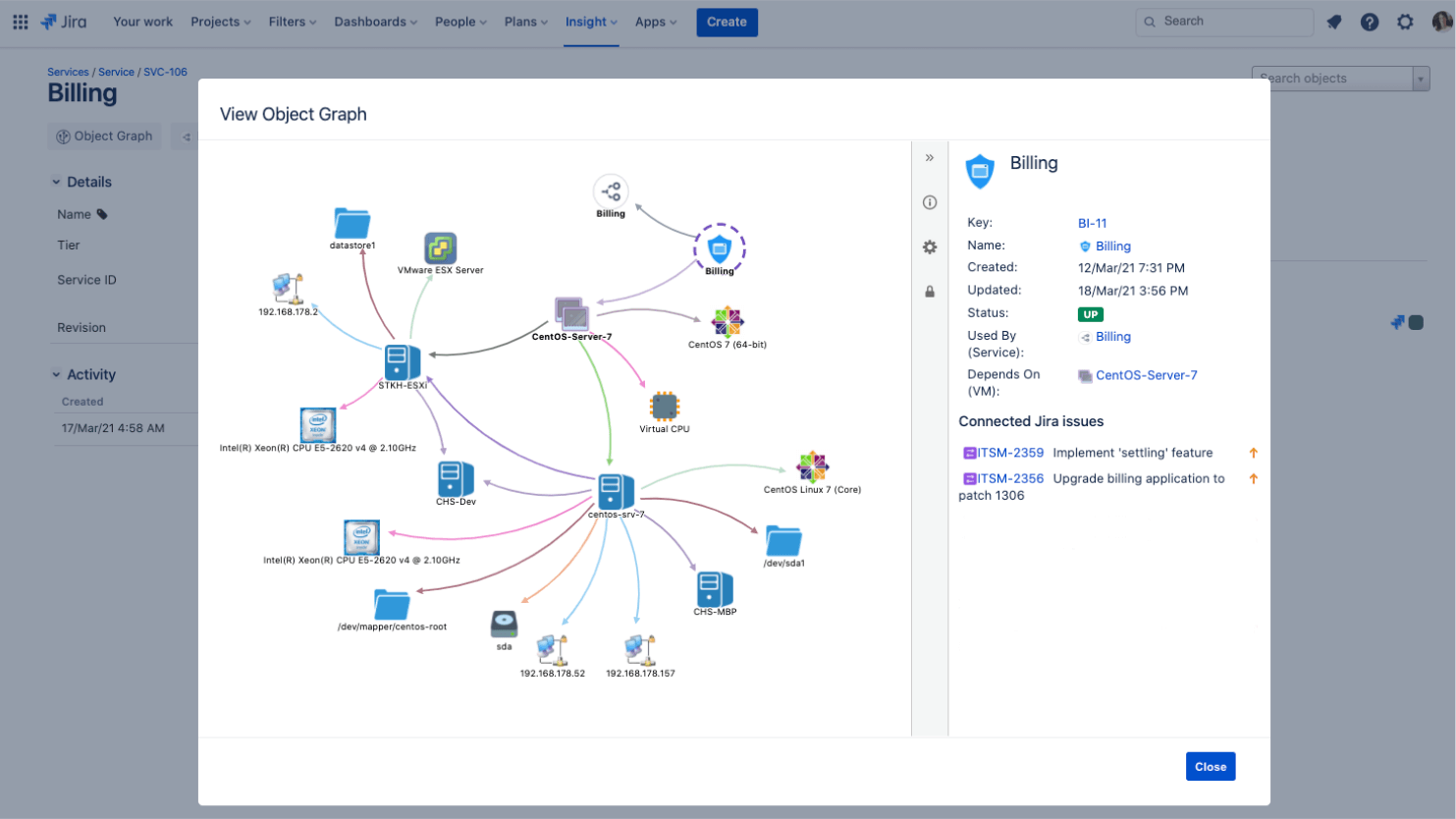
Creating a custom Assets objects field allows your team to access Assets objects directly from the issue view. This is a powerful feature of Assets in Jira Service Management that can help your agents get the context they need to resolve an issue or request quickly and effectively.
Adding an object (i.e. as a value) to the Assets objects custom field creates a link between an issue and an object. This then allows you to see all of the connected issues from the object view.
This is useful for incident management because you can use the graph to traverse through dependencies and understand where things have gone wrong.
It’s also useful for change management because it allows you to see the bigger picture and evaluate risk - easier to do when you can see what depends on the item you’re making changes to.
### Get object by ID
`GET /jsm/assets/workspace/{workspaceId}/v1/object/{id}`
The Get method load one object.
{% code fullWidth="true" %}
```go
package main
import (
"context"
"fmt"
"github.com/ctreminiom/go-atlassian/assets"
"github.com/ctreminiom/go-atlassian/jira/sm"
"github.com/davecgh/go-spew/spew"
"log"
"os"
)
func main() {
var (
host = os.Getenv("HOST")
mail = os.Getenv("MAIL")
token = os.Getenv("TOKEN")
)
serviceManagement, err := sm.New(nil, host)
if err != nil {
log.Fatal(err)
}
serviceManagement.Auth.SetBasicAuth(mail, token)
serviceManagement.Auth.SetUserAgent("curl/7.54.0")
// Get the workspace ID
workspaces, response, err := serviceManagement.WorkSpace.Gets(context.Background())
if err != nil {
if response != nil {
log.Println(response.Bytes.String())
log.Println("Endpoint:", response.Endpoint)
}
log.Fatal(err)
}
workSpaceID := workspaces.Values[0].WorkspaceId
// Instance the Assets Cloud client
asset, err := assets.New(nil)
if err != nil {
log.Fatal(err)
}
asset.Auth.SetBasicAuth(mail, token)
object, response, err := asset.Object.Get(context.Background(), workSpaceID, "AS-3")
if err != nil {
if response != nil {
log.Println(response.Bytes.String())
log.Println("Endpoint:", response.Endpoint)
}
log.Fatal(err)
}
fmt.Println("--------")
fmt.Println("Object ID:", object.ID)
fmt.Println("Object Workspace ID:", object.WorkspaceId)
fmt.Println("Object Global ID:", object.GlobalId)
fmt.Println("Object Label:", object.Label)
fmt.Println("Object ObjectKey:", object.ObjectKey)
fmt.Println("Object ObjectType ID:", object.ObjectType.Id)
fmt.Println("Object ObjectType Name:", object.ObjectType.Name)
for index, attribute := range object.Attributes {
fmt.Println("--------------")
fmt.Println(index, "Attribute Global ID:", attribute.GlobalId)
fmt.Println(index, "Attribute Reference:", attribute.ID)
fmt.Println(index, "Attribute Name:", attribute.ObjectTypeAttribute.Name)
fmt.Println(index, "Attribute Type:", attribute.ObjectTypeAttribute.DefaultType.Name)
fmt.Println(index, "Attribute Options:", attribute.ObjectTypeAttribute.Options)
fmt.Println(index, "Attribute TypeAttributeId:", attribute.ObjectTypeAttributeId)
fmt.Println("--------------")
}
log.Println("Endpoint:", response.Endpoint)
spew.Dump(object)
}
```
{% endcode %}
### Update object by ID
`PUT /jsm/assets/workspace/{workspaceId}/v1/object/{id}`
The ***Update*** method updates an asset object.
{% code fullWidth="true" %}
```go
package main
import (
"context"
"fmt"
"github.com/ctreminiom/go-atlassian/assets"
"github.com/ctreminiom/go-atlassian/jira/sm"
"github.com/ctreminiom/go-atlassian/pkg/infra/models"
"log"
"os"
)
func main() {
var (
host = os.Getenv("HOST")
mail = os.Getenv("MAIL")
token = os.Getenv("TOKEN")
)
serviceManagement, err := sm.New(nil, host)
if err != nil {
log.Fatal(err)
}
serviceManagement.Auth.SetBasicAuth(mail, token)
serviceManagement.Auth.SetUserAgent("curl/7.54.0")
// Get the workspace ID
workspaces, response, err := serviceManagement.WorkSpace.Gets(context.Background())
if err != nil {
if response != nil {
log.Println(response.Bytes.String())
log.Println("Endpoint:", response.Endpoint)
}
log.Fatal(err)
}
workSpaceID := workspaces.Values[0].WorkspaceId
// Instance the Assets Cloud client
asset, err := assets.New(nil)
if err != nil {
log.Fatal(err)
}
asset.Auth.SetBasicAuth(mail, token)
payload := &models.ObjectPayloadScheme{
ObjectTypeID: "1",
AvatarUUID: "",
HasAvatar: false,
Attributes: []*models.ObjectPayloadAttributeScheme{
{
ObjectTypeAttributeID: "16",
ObjectAttributeValues: []*models.ObjectPayloadAttributeValueScheme{
{
Value: "A placeholder value",
},
},
},
},
}
object, response, err := asset.Object.Update(context.Background(), workSpaceID, "AS-2", payload)
if err != nil {
if response != nil {
log.Println(response.Bytes.String())
log.Println("Endpoint:", response.Endpoint)
}
log.Fatal(err)
}
fmt.Println("--------")
fmt.Println(object.ID)
fmt.Println(object.WorkspaceId)
fmt.Println(object.GlobalId)
fmt.Println(object.Label)
fmt.Println(object.ObjectKey)
fmt.Println(object.Avatar.ObjectId)
fmt.Println(object.ObjectType.Name)
fmt.Println(len(object.Attributes))
fmt.Println("--------")
}
```
{% endcode %}
### Delete object by ID
`DELETE /jsm/assets/workspace/{workspaceId}/v1/object/{id}`
The ***Delete*** method deletes an asset object.
{% code fullWidth="true" %}
```go
package main
import (
"context"
"github.com/ctreminiom/go-atlassian/assets"
"github.com/ctreminiom/go-atlassian/jira/sm"
"log"
"os"
)
func main() {
var (
host = os.Getenv("HOST")
mail = os.Getenv("MAIL")
token = os.Getenv("TOKEN")
)
serviceManagement, err := sm.New(nil, host)
if err != nil {
log.Fatal(err)
}
serviceManagement.Auth.SetBasicAuth(mail, token)
serviceManagement.Auth.SetUserAgent("curl/7.54.0")
// Get the workspace ID
workspaces, response, err := serviceManagement.WorkSpace.Gets(context.Background())
if err != nil {
if response != nil {
log.Println(response.Bytes.String())
log.Println("Endpoint:", response.Endpoint)
}
log.Fatal(err)
}
workSpaceID := workspaces.Values[0].WorkspaceId
// Instance the Assets Cloud client
asset, err := assets.New(nil)
if err != nil {
log.Fatal(err)
}
asset.Auth.SetBasicAuth(mail, token)
response, err = asset.Object.Delete(context.Background(), workSpaceID, "AS-2")
if err != nil {
if response != nil {
log.Println(response.Bytes.String())
log.Println("Endpoint:", response.Endpoint)
}
log.Fatal(err)
}
log.Println("Endpoint:", response.Endpoint)
}
```
{% endcode %}
### Get object attributes
`GET /jsm/assets/workspace/{workspaceId}/v1/object/{id}/attributes`
The ***Attributes*** method returns the asset object attributes.
{% code fullWidth="true" %}
```go
package main
import (
"context"
"fmt"
"github.com/ctreminiom/go-atlassian/assets"
"github.com/ctreminiom/go-atlassian/jira/sm"
"log"
"os"
)
func main() {
var (
host = os.Getenv("HOST")
mail = os.Getenv("MAIL")
token = os.Getenv("TOKEN")
)
serviceManagement, err := sm.New(nil, host)
if err != nil {
log.Fatal(err)
}
serviceManagement.Auth.SetBasicAuth(mail, token)
serviceManagement.Auth.SetUserAgent("curl/7.54.0")
// Get the workspace ID
workspaces, response, err := serviceManagement.WorkSpace.Gets(context.Background())
if err != nil {
if response != nil {
log.Println(response.Bytes.String())
log.Println("Endpoint:", response.Endpoint)
}
log.Fatal(err)
}
workSpaceID := workspaces.Values[0].WorkspaceId
// Instance the Assets Cloud client
asset, err := assets.New(nil)
if err != nil {
log.Fatal(err)
}
asset.Auth.SetBasicAuth(mail, token)
attributes, response, err := asset.Object.Attributes(context.Background(), workSpaceID, "AS-3")
if err != nil {
if response != nil {
log.Println(response.Bytes.String())
log.Println("Endpoint:", response.Endpoint)
}
log.Fatal(err)
}
for index, attribute := range attributes {
fmt.Println("--------------")
fmt.Println(index, "Attribute Global ID:", attribute.GlobalId)
fmt.Println(index, "Attribute Reference:", attribute.ID)
fmt.Println(index, "Attribute Name:", attribute.ObjectTypeAttribute.Name)
fmt.Println(index, "Attribute Type:", attribute.ObjectTypeAttribute.DefaultType.Name)
fmt.Println(index, "Attribute Options:", attribute.ObjectTypeAttribute.Options)
fmt.Println(index, "Attribute TypeAttributeId:", attribute.ObjectTypeAttributeId)
fmt.Println("--------------")
}
log.Println("Endpoint:", response.Endpoint)
}
```
{% endcode %}
### Get object changelogs
`GET /jsm/assets/workspace/{workspaceId}/v1/object/{id}/history`
The ***History*** method returns the asset object changelogs.
{% code fullWidth="true" %}
```go
package main
import (
"context"
"github.com/ctreminiom/go-atlassian/assets"
"github.com/ctreminiom/go-atlassian/jira/sm"
"github.com/davecgh/go-spew/spew"
"log"
"os"
)
func main() {
var (
host = os.Getenv("HOST")
mail = os.Getenv("MAIL")
token = os.Getenv("TOKEN")
)
serviceManagement, err := sm.New(nil, host)
if err != nil {
log.Fatal(err)
}
serviceManagement.Auth.SetBasicAuth(mail, token)
serviceManagement.Auth.SetUserAgent("curl/7.54.0")
// Get the workspace ID
workspaces, response, err := serviceManagement.WorkSpace.Gets(context.Background())
if err != nil {
if response != nil {
log.Println(response.Bytes.String())
log.Println("Endpoint:", response.Endpoint)
}
log.Fatal(err)
}
workSpaceID := workspaces.Values[0].WorkspaceId
// Instance the Assets Cloud client
asset, err := assets.New(nil)
if err != nil {
log.Fatal(err)
}
asset.Auth.SetBasicAuth(mail, token)
history, response, err := asset.Object.History(context.Background(), workSpaceID, "AS-3", true)
if err != nil {
if response != nil {
log.Println(response.Bytes.String())
log.Println("Endpoint:", response.Endpoint)
}
log.Fatal(err)
}
for _, record := range history {
spew.Dump(record)
}
log.Println("Endpoint:", response.Endpoint)
}
```
{% endcode %}
### Get object references
`GET /jsm/assets/workspace/{workspaceId}/v1/object/{id}/referenceinfo`
The ***References*** method returns the asset object references links.
{% code fullWidth="true" %}
```go
package main
import (
"context"
"github.com/ctreminiom/go-atlassian/assets"
"github.com/ctreminiom/go-atlassian/jira/sm"
"github.com/davecgh/go-spew/spew"
"log"
"os"
)
func main() {
var (
host = os.Getenv("HOST")
mail = os.Getenv("MAIL")
token = os.Getenv("TOKEN")
)
serviceManagement, err := sm.New(nil, host)
if err != nil {
log.Fatal(err)
}
serviceManagement.Auth.SetBasicAuth(mail, token)
serviceManagement.Auth.SetUserAgent("curl/7.54.0")
// Get the workspace ID
workspaces, response, err := serviceManagement.WorkSpace.Gets(context.Background())
if err != nil {
if response != nil {
log.Println(response.Bytes.String())
log.Println("Endpoint:", response.Endpoint)
}
log.Fatal(err)
}
workSpaceID := workspaces.Values[0].WorkspaceId
// Instance the Assets Cloud client
asset, err := assets.New(nil)
if err != nil {
log.Fatal(err)
}
asset.Auth.SetBasicAuth(mail, token)
references, response, err := asset.Object.References(context.Background(), workSpaceID, "AS-3")
if err != nil {
if response != nil {
log.Println(response.Bytes.String())
log.Println("Endpoint:", response.Endpoint)
}
log.Fatal(err)
}
for _, record := range references {
spew.Dump(record)
}
log.Println("Endpoint:", response.Endpoint)
}
```
{% endcode %}
### Create object
`POST /jsm/assets/workspace/{workspaceId}/v1/object/create`
The ***Create*** method creates an asset object
{% code fullWidth="true" %}
```go
package main
import (
"context"
"github.com/ctreminiom/go-atlassian/assets"
"github.com/ctreminiom/go-atlassian/jira/sm"
"github.com/ctreminiom/go-atlassian/pkg/infra/models"
"github.com/davecgh/go-spew/spew"
"log"
"os"
)
func main() {
var (
host = os.Getenv("HOST")
mail = os.Getenv("MAIL")
token = os.Getenv("TOKEN")
)
serviceManagement, err := sm.New(nil, host)
if err != nil {
log.Fatal(err)
}
serviceManagement.Auth.SetBasicAuth(mail, token)
serviceManagement.Auth.SetUserAgent("curl/7.54.0")
// Get the workspace ID
workspaces, response, err := serviceManagement.WorkSpace.Gets(context.Background())
if err != nil {
if response != nil {
log.Println(response.Bytes.String())
log.Println("Endpoint:", response.Endpoint)
}
log.Fatal(err)
}
workSpaceID := workspaces.Values[0].WorkspaceId
// Instance the Assets Cloud client
asset, err := assets.New(nil)
if err != nil {
log.Fatal(err)
}
asset.Auth.SetBasicAuth(mail, token)
payload := &models.ObjectPayloadScheme{
ObjectTypeID: "3",
AvatarUUID: "",
HasAvatar: false,
Attributes: []*models.ObjectPayloadAttributeScheme{
{
ObjectTypeAttributeID: "13",
ObjectAttributeValues: []*models.ObjectPayloadAttributeValueScheme{
{
Value: "SmartPhone Mocked",
},
},
},
},
}
object, response, err := asset.Object.Create(context.Background(), workSpaceID, payload)
if err != nil {
if response != nil {
log.Println(response.Bytes.String())
log.Println("Endpoint:", response.Endpoint)
}
log.Fatal(err)
}
spew.Dump(object)
}
```
{% endcode %}
### Get object tickets
`GET /jsm/assets/workspace/{workspace}/v1/objectconnectedtickets/{object}/tickets`
The ***Relation*** method returns the relation between Jira issues and Assets objects
{% code fullWidth="true" %}
```go
package main
import (
"context"
"fmt"
"github.com/ctreminiom/go-atlassian/assets"
"github.com/ctreminiom/go-atlassian/jira/sm"
"log"
"os"
)
func main() {
var (
host = os.Getenv("HOST")
mail = os.Getenv("MAIL")
token = os.Getenv("TOKEN")
)
serviceManagement, err := sm.New(nil, host)
if err != nil {
log.Fatal(err)
}
serviceManagement.Auth.SetBasicAuth(mail, token)
serviceManagement.Auth.SetUserAgent("curl/7.54.0")
// Get the workspace ID
workspaces, response, err := serviceManagement.WorkSpace.Gets(context.Background())
if err != nil {
if response != nil {
log.Println(response.Bytes.String())
log.Println("Endpoint:", response.Endpoint)
}
log.Fatal(err)
}
workSpaceID := workspaces.Values[0].WorkspaceId
// Instance the Assets Cloud client
asset, err := assets.New(nil)
if err != nil {
log.Fatal(err)
}
asset.Auth.SetBasicAuth(mail, token)
tickets, response, err := asset.Object.Relation(context.Background(), workSpaceID, "SVC-1")
if err != nil {
if response != nil {
log.Println(response.Bytes.String())
log.Println("Endpoint:", response.Endpoint)
}
log.Fatal(err)
}
for _, ticket := range tickets.Tickets {
fmt.Println(ticket.Id, ticket.Key)
}
log.Println("Endpoint:", response.Endpoint)
}
```
{% endcode %}
### Filter objects
`POST /jsm/assets/workspace/{workspaceId}/v1/object/aql`
The ***Filter*** method returns Objects using an AQL query
{% code fullWidth="true" %}
```go
package main
import (
"context"
"fmt"
"github.com/ctreminiom/go-atlassian/assets"
"github.com/ctreminiom/go-atlassian/jira/sm"
"log"
"os"
)
func main() {
var (
host = os.Getenv("HOST")
mail = os.Getenv("MAIL")
token = os.Getenv("TOKEN")
)
serviceManagement, err := sm.New(nil, host)
if err != nil {
log.Fatal(err)
}
serviceManagement.Auth.SetBasicAuth(mail, token)
serviceManagement.Auth.SetUserAgent("curl/7.54.0")
// Get the workspace ID
workspaces, response, err := serviceManagement.WorkSpace.Gets(context.Background())
if err != nil {
if response != nil {
log.Println(response.Bytes.String())
log.Println("Endpoint:", response.Endpoint)
}
log.Fatal(err)
}
workSpaceID := workspaces.Values[0].WorkspaceId
// Instance the Assets Cloud client
asset, err := assets.New(nil)
if err != nil {
log.Fatal(err)
}
asset.Auth.SetBasicAuth(mail, token)
objects, response, err := asset.Object.Filter(context.Background(), workSpaceID, "Name LIKE Test", true, 0, 50)
if err != nil {
if response != nil {
log.Println(response.Bytes.String())
log.Println("Endpoint:", response.Endpoint)
}
log.Fatal(err)
}
log.Println(objects.Total)
log.Println(objects.IsLast)
log.Println(objects.MaxResults)
log.Println(objects.StartAt)
log.Println(len(objects.Values))
for _, object := range objects.Values {
fmt.Println(object.ID)
}
}
```
{% endcode %}
### Search objects
`POST /jsm/assets/workspace/{workspaceId}/v1/object/navlist/aql`
The ***Search*** method retrieves a list of objects based on an AQL. Please **note** that the preferred endpoint is `/aql`
{% code fullWidth="true" %}
```go
package main
import (
"context"
"fmt"
"github.com/ctreminiom/go-atlassian/assets"
"github.com/ctreminiom/go-atlassian/jira/sm"
"github.com/ctreminiom/go-atlassian/pkg/infra/models"
"log"
"os"
)
func main() {
var (
host = os.Getenv("HOST")
mail = os.Getenv("MAIL")
token = os.Getenv("TOKEN")
)
serviceManagement, err := sm.New(nil, host)
if err != nil {
log.Fatal(err)
}
serviceManagement.Auth.SetBasicAuth(mail, token)
serviceManagement.Auth.SetUserAgent("curl/7.54.0")
// Get the workspace ID
workspaces, response, err := serviceManagement.WorkSpace.Gets(context.Background())
if err != nil {
if response != nil {
log.Println(response.Bytes.String())
log.Println("Endpoint:", response.Endpoint)
}
log.Fatal(err)
}
workSpaceID := workspaces.Values[0].WorkspaceId
// Instance the Assets Cloud client
asset, err := assets.New(nil)
if err != nil {
log.Fatal(err)
}
asset.Auth.SetBasicAuth(mail, token)
payload := &models.ObjectSearchParamsScheme{
Query: "Name LIKE Test",
Iql: "",
ObjectTypeID: "1",
Page: 0,
ResultPerPage: 25,
OrderByTypeAttributeID: 0,
Asc: 0,
ObjectID: "",
ObjectSchemaID: "1",
IncludeAttributes: false,
AttributesToDisplay: nil,
}
objects, response, err := asset.Object.Search(context.Background(), workSpaceID, payload)
if err != nil {
if response != nil {
log.Println(response.Bytes.String())
log.Println("Endpoint:", response.Endpoint)
}
log.Fatal(err)
}
for _, entry := range objects.ObjectEntries {
fmt.Println(entry.ID, entry.Updated)
}
for _, attribute := range objects.ObjectTypeAttributes {
fmt.Println(attribute.Name, attribute.ID, attribute.GlobalId)
}
fmt.Println(objects.OrderWay)
fmt.Println(objects.QlQuery)
}
```
{% endcode %}
---
# Agent Instructions
This documentation is published with GitBook. GitBook is the documentation platform designed so that both humans and AI agents can read, navigate, and reason over technical content effectively. Learn more at gitbook.com.
## Querying This Documentation
If you need additional information that is not directly available in this page, you can query the documentation by asking a question.
Perform an HTTP GET request on the following URL with the `ask` and `goal` query parameters:
```
GET https://docs.go-atlassian.io/jira-assets/object.md?ask=&goal=
```
`ask` is the immediate question: it should be specific, self-contained, and written in natural language.
`goal` is what the user is ultimately trying to achieve, the reason they need the answer. Sharing it helps GitBook give you a better, more relevant answer. A goal is most helpful when it describes the outcome the user wants rather than restating the question. For example, with `ask=how do I create an API token`, a goal like `automate deployments from our CI pipeline` lets GitBook tailor the answer to that use case.
The response will contain a direct answer to the question and relevant excerpts and sources from the documentation.
Use this mechanism when the answer is not explicitly present in the current page, you need clarification or additional context, or you want to retrieve related documentation sections.